Minicars Soccer
Top-down car football for one or two players: pick one of seven cars and a ball size, drive into a giant ball and score five before your rival.
More arcade games

















What is Minicars Soccer?
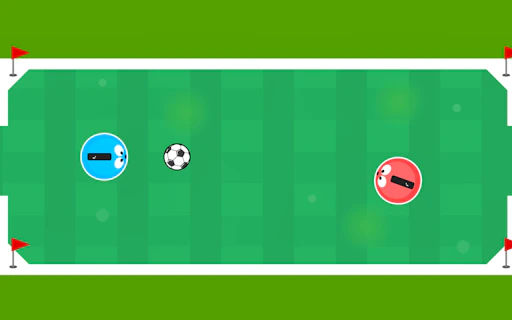
Minicars Soccer is a free top-down car football game in which two small cars — one red, one blue — push an oversized ball around a walled pitch, and the first to score five goals wins. You choose one of seven cars and a large, medium or small ball, and play against the computer or a second player on the same keyboard.
On its title screen the game calls itself MiniCar Soccer, and it carries TwoPlayerGames.org branding on the loading screen, the title screen and the boards around the pitch. GameDistribution lists it under RHM Interactive and published it on January 17, 2019, which makes it one of the oldest games in our arcade. It still draws players: when we reviewed GameDistribution’s 228 football games in October 2026, Minicars Soccer had the fifth-highest page count on GameDistribution’s own site, with 1,692 views.
The cars are the game. The setup screen rates each one on Max Speed, Acceleration and Steer Speed with rows of dots, and the seven models are very different: at one end a formula car with six dots of top speed and five of acceleration, at the other a small rounded hatchback with a single dot for top speed and steering. The default coupé sits in the middle, with four, three and four.
Minicars Soccer matches are quick and physical. The ball is big compared with the cars, so you do not dribble it so much as ram it, and a car can be knocked off line by its rival as easily as the ball can. Each net belongs to one side — the red net is on the left, the blue net on the right — and when the ball goes in, a “GOOAAL…!” banner fills the pitch, a three-second countdown starts, and the arena changes colour for the next kick-off.
Two things set Minicars Soccer apart from the other driving game in our arcade, Turbo Truck Soccer. First, Minicars Soccer is a proper two-player game on one keyboard, with each player on a separate set of keys. Second, you can change your car and the ball in the middle of a match: arrows marked Change Car and Change Ball sit at the top of the screen, and the game’s own tip says that “if your car is fast or slow, you can change it here.”
The game also places bonuses on the pitch during play. The setup screen names three — Fast, Stop and Slow, drawn as a rabbit, a no-entry sign and a tortoise — and the official description says that collecting them “you can have the advantage”. A Bonus Time counter for each side sits at the top of the screen.
Playing Minicars Soccer
- 1Pick 1P or 2P
Press Play, then 1P to drive against the computer or 2P to play a friend on the same keyboard.
- 2Choose a car
Use the arrows in the Select Car panel to browse the seven Minicars Soccer cars. The dots show each one’s Max Speed, Acceleration and Steer Speed.
- 3Choose a ball
Use the arrows in the Select Ball panel to pick a large, medium or small ball. Test the Car lets you try your choice before the match.
- 4Drive into the ball
Press Start. Up (or W) drives forward, left and right steer, and Down (or S) reverses. Hit the ball to push it toward the other side’s net.
- 5Grab the bonuses
Bonus icons appear on the pitch during the match. The setup screen lists them as Fast, Stop and Slow.
- 6Score five
The first side to five goals wins, and the game names the winner — “BLUE WINS”, for example — with buttons to play again or return to the main menu.
Minicars Soccer controls
| Input | Action |
|---|---|
| Arrow keys | 1P: drive the blue car · 2P: Player 2 (blue) |
| W / A / S / D | 2P: Player 1 (red) |
| Up or W | Drive forward |
| Left / Right or A / D | Steer |
| Down or S | Reverse |
| Change Car / Change Ball arrows (top) | Swap car or ball mid-match |
| Pause button (top left) | Pause the match |
Modes & progression
You drive the blue car with the arrow keys; the computer drives the red one.
Red against blue on one keyboard — W, A, S, D for Player 1 and the arrow keys for Player 2.
From a formula car (six dots of top speed, five of acceleration) to a slow, low-grip hatchback, with a coupé, a striped sports car, a muscle car and two pickups in between.
Large, medium or small, chosen before kick-off and changeable mid-match with the Change Ball arrows in the scoreboard.
How to win at Minicars Soccer
Pick acceleration over top speed. The pitch is small and the play stops and starts. A car with good acceleration reaches the ball first after every kick-off, which matters more than a high top speed you rarely reach.
Hit the ball from behind. A Minicars Soccer car pushes the ball the way it is travelling. Circle round so you approach with the opponent’s net behind the ball, rather than ramming it from the side.
Use reverse to recover. When you overshoot the ball or end up against a wall, back out with Down or S instead of turning a full circle.
Change the car if it is not working. You do not have to restart Minicars Soccer to try another car. The Change Car arrows at the top of the screen swap it during the match.
Do not panic against the computer. The computer’s red car never stops chasing the ball, but it is not always accurate. In one 1P match we barely touched the keys and blue still won 5–1.
Mind your own net. The nets belong to the sides: blue scores in the red net on the left, red scores in the blue net on the right. In a scramble near your own goal, a hurried shunt is as likely to score for the other side.
Agree on keys first. In 2P, Player 1 has W, A, S, D and the red car; Player 2 has the arrow keys and the blue car. Sit on the matching sides of the keyboard before you press Start.
Good to know — Minicars Soccer lets you swap your car and the ball without leaving the match — the Change Car and Change Ball arrows sit in the scoreboard at the top of the screen.
What makes Minicars Soccer fun
- Seven cars rated for Max Speed, Acceleration and Steer Speed
- Large, medium and small balls
- Fast, Stop and Slow bonuses on the pitch
- Change your car or the ball during a match
- Test the Car before you start
- 1 player against the computer, or 2 players on one keyboard
- First to five goals, with a new arena colour after every goal
- Free in the browser, no download and no signup
Why play Minicars Soccer on PlayFutbol?
Minicars Soccer runs free and instantly in your browser here — no download, no signup, on phone or desktop. And when you want to test your football brain rather than your reflexes, it sits alongside 48 original daily football trivia games made by PlayFutbol.
Explore PlayFutbol's daily gamesFrequently asked questions
Choose a car and a ball size, press Start, and drive into the ball to push it into the other side’s net. Up drives forward, left and right steer, and Down reverses. The first side to five goals wins.
In 1 player mode you drive the blue car with the arrow keys. In 2 player mode Player 1 drives the red car with W, A, S, D and Player 2 drives the blue car with the arrow keys.
Seven. Each has its own Max Speed, Acceleration and Steer Speed, shown as dots on the setup screen. The formula car is the fastest; the small hatchback is the slowest and the hardest to steer.
Yes. Before the match you can pick a large, medium or small ball, and the Change Ball arrows at the top of the screen let you switch during play.
Bonus icons appear on the pitch during a match. The setup screen names them Fast, Stop and Slow, and the official description says picking them up gives you an advantage. A Bonus Time counter for each side runs at the top of the screen.
Yes — 2P mode is for two people on one keyboard, red against blue. The menu has only 1P and 2P, so there is no online mode.
Five. When one side reaches five, the game names the winner — our match ended “BLUE WINS” — and offers Play Again or Go to Main Menu.
The game carries TwoPlayerGames.org branding, and its title screen reads “MiniCar Soccer”. GameDistribution lists the publisher as RHM Interactive and published it on January 17, 2019.
GameDistribution lists it for Android in landscape. We tested it with a keyboard, which is what both the 1P and 2P controls are built around, so a computer is the most comfortable way to play.
Yes. Minicars Soccer runs free in your browser on PlayFutbol, with no download and no account.
Minicars Soccer is a third-party HTML5 game served via GameDistribution and embedded here for free play. PlayFutbol's own 48 daily football trivia games are first-party.